Scam signals
The Bank Call That Wants You to Move Your Money
A calm callback routine for an alarming call, including what changes when a caller already knows something true about your account.
A scan can open a perfectly polished payment page for the wrong recipient. Establish the operator first, then choose how to pay.
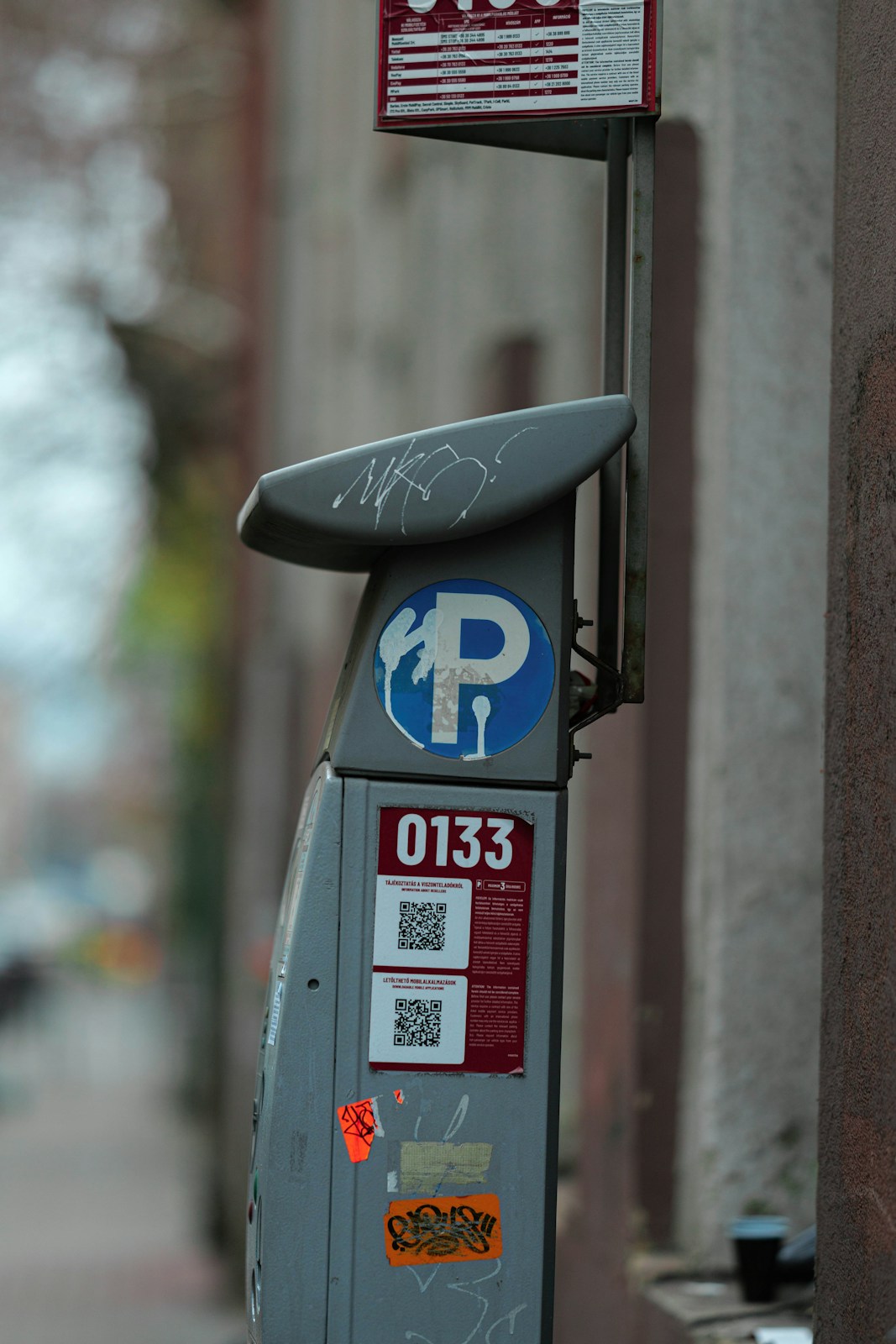
A parking-meter sticker offers an easy shortcut: scan, pay and get on with the day. Before using it, I would separate the printed code from the parking operator. A QR code points to information or a destination; its presence on a meter does not establish who put it there. A convincing payment page can still be unrelated to the place where you parked.
The distinction I use is between the operator, the location identifier and the payment route. You need those details to fit together. The FBI's warning about tampered physical QR codes explains why an added sticker deserves attention, but suspicious appearance is not a complete test. A genuine label can be worn or replaced, and a fraudulent one can be neatly printed. An independently opened official service is a better starting point than appearance alone.
This guide follows a hypothetical parking decision from reading the signs to choosing another payment route or moving the car. It also covers what to do if you already entered information. Local parking rules and accepted methods vary, so the operator's current instructions matter. Avoid assuming that a broken machine, suspicious sticker or report to the operator automatically creates an exemption from payment.
When you look at a parking meter, your eyes naturally gravitate toward the high-contrast square code because it represents an immediate action. However, the code is only one small element of a much larger physical notice. I would start by reading the surrounding text carefully. Look for the formal name of the parking operator, municipal authority, or private management company. Check if the sign lists customer service phone numbers, terms of parking, and official branding that matches the physical environment around you.
Look for signs of a label laid over another code, inconsistent operator names or instructions that conflict with nearby notices. These are reasons to investigate, not a verdict. Do not peel off a sticker to discover what you hope is the real code; the underlying label could be outdated too. Note the location and compare it with information from the operator reached independently.
A camera preview may show the destination before opening it. Read it, but do not expect to recognize every legitimate provider or detect every deceptive address. A familiar logo or encrypted connection is not enough. If the route is unclear, stop at that point and find the operator's supported alternative instead of treating a successful page load as evidence that payment will reach the right place.
Find the operator name and, where used, the bay, zone or location code. Different car parks identify spaces differently; not every system uses a zone number or a permanent metal marking. Compare the instructions across the location and with an independently reached official source. If the app shows a street or lot name, check that as well as the number before selecting a stay.
Suppose a municipal lot's sticker opens an unfamiliar payment domain. That is a reason to check, but an outside provider can also be legitimate. Open the council's known website independently and look for its parking payment instructions. Does it name the same provider and include this location? If you cannot reconcile the information, leave the QR route unused and use an alternative the actual operator supports.
The practical check is about the parking arrangement, not proving who owns the land. A shopping center may use a contracted operator and an outside payment service. The names may differ for legitimate reasons. What you want is a traceable instruction from the known operator to the accepted method, followed by the correct location, vehicle registration and duration. Do not invent a connection simply because the page looks professional.
If you already use the official app named by the operator, open it directly from your phone. This avoids the particular link printed on the sticker. Check that the operator still accepts the app at this location; having used it successfully elsewhere is not enough. If an app needs installing, find the correct listing through the operator's official instructions and check the publisher in the device's app store.
Enter the location identifier carefully and read back the displayed place, vehicle and duration. Manual entry avoids following the QR destination, but it does not guarantee you selected the right bay or that every other detail is correct. A receipt for a neighboring zone can still leave your car without the intended parking session. Before walking away, confirm the payment result and keep the relevant confirmation.
A working on-site machine may be another accepted route. Read its instructions, check for obvious tampering and use it only if it appears consistent with the operator's arrangement. Some sites require a displayed ticket; others use number-plate records. Follow the actual local instructions. Physical payment avoids the particular web link you declined, but a machine is not automatically trustworthy simply because it is bolted to a post.
Modern smartphones often display a preview of the web address when you focus your camera on a square code or immediately after tapping it. I would start by training yourself to actually read that destination URL before confirming the page load. If the web address uses an unfamiliar domain name, a strange string of random characters, or a spelling variation of a well-known parking brand, stop immediately. A padlock icon or a clean visual design does not mean the website belongs to the legitimate operator.
According to guidance from the US Federal Trade Commission on avoiding online scams, impostor websites often go to great lengths to mimic legitimate corporate branding, including stolen logos and professional layouts. If the landing page asks you to download an unverified mobile application from a direct web link rather than an official app store, or if it requests unnecessary personal data such as your home address or full account passwords just to pay for an hour of parking, close the browser tab.
Unexpected requests to install a device configuration profile, supply an unrelated account password or grant broad access are reasons to stop. Legitimate checkout requirements vary, so do not rely on a rigid list of the only fields a real operator ever asks for. Instead, ask whether the request fits the transaction and can be confirmed through the operator's official instructions. A parking payment should not become an excuse for giving a stranger control of your device.
Standing in a busy car park with unverified payment stickers and a malfunctioning meter can test anyone's patience. In such moments, having a pre-determined plan B prevents hasty mistakes driven by the fear of receiving a parking citation. If you cannot establish a verified payment route through an official app, a physical machine, or trusted signage, the most prudent choice is often to move your vehicle to another bay or a completely different car park.
Imagine a lot with conflicting stickers and a central pay station that is out of service. You cannot find a payment route you can verify. Relocating to a place with clearer instructions may be the simplest available choice, if you can do so safely and lawfully. The alternative site still deserves the usual checks; moving the car does not remove all uncertainty, and no guide can promise a nearby attended garage will be open.
If useful and safe, take a photograph of the signs and note the time and location. Describe a sticker as suspicious unless tampering has been confirmed. Such records may help the operator investigate or support a later enquiry, but they do not guarantee cancellation of a parking notice. Check the operator's own instructions for unavailable machines and disputes rather than assuming the payment problem changes the parking terms.
Realizing you may have entered credit card information into an impostor parking page can induce instant panic, but taking methodical action minimizes potential damage. I would start by contacting your card issuer immediately. Do not rely on email notifications or web chat interfaces if you suspect active fraud; use the verified telephone number printed on the back of your physical payment card or access your bank's official mobile banking application directly.
Tell the issuer what you entered, whether you approved a payment and when it happened. Ask what card or account protections fit the incident and how to report an unrecognized charge. A replacement card, transaction dispute and transfer recall are different processes; let the actual provider explain the available options. Keep a short record of the reference number and next action without assuming a refund is guaranteed.
Separately report the suspicious sticker to the parking operator through an independently obtained route. Give the meter or location identifier and describe what you observed. That report lets the operator investigate; it does not itself secure your card or confirm that parking was paid. Check those questions separately. If a real parking session was never created, ask the operator how to resolve it through its legitimate process.
Do not rely on removing a label to settle which payment method is genuine. Note the precise location and let the operator investigate the physical hazard safely.
Scanning a code does not in itself show that a payment occurred. Close the browser destination immediately and check your device for any unauthorized downloads or permissions.
Use the operator's independently opened official instructions to identify its accepted provider, then check the app-store listing and publisher. An app store is a better source than an unsolicited download, but a similar name or logo alone does not establish the correct app.
Treat an isolated sticker with extreme caution. If you cannot verify the operator or find permanent zone markings, choose another parking space to avoid complications.
No. An HTTPS connection only encrypts data in transit between your device and the destination server; it does not verify the identity or honesty of the website operator.
Before paying, connect three facts: the actual operator, the correct parking location and an accepted payment method reached independently. If they do not line up, stop and choose another supported route or another lawful place to park. If details were already shared, contact the payment provider while treating the parking issue as a separate problem to resolve.
Have a correction? Contact the editors.
A calm callback routine for an alarming call, including what changes when a caller already knows something true about your account.
Keep a simple sale from turning into a request to move someone else’s money, even when the payment appears convincing.
Separate an invoice, an actual charge and a request to control your computer before trying to cancel anything.